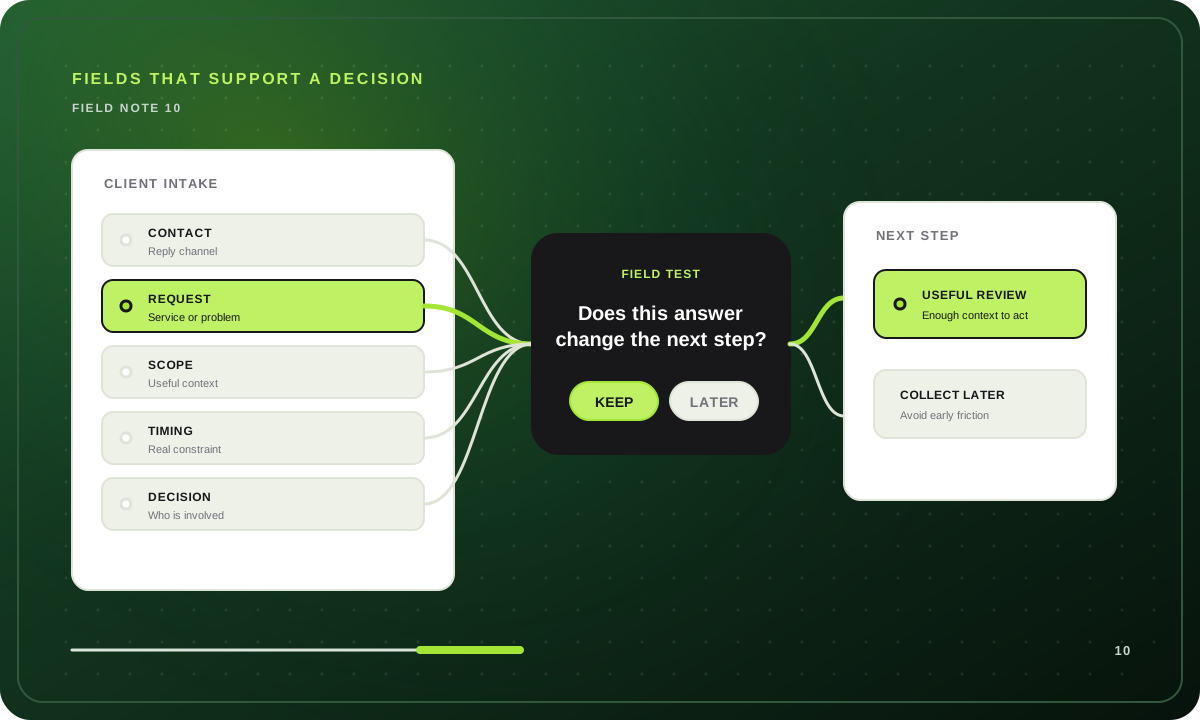
What information does the client intake form gather? It should gather the minimum context a business needs to understand a request and choose a useful next step. For most service businesses, that means contact details, the requested service or problem, the desired outcome, practical scope, timing, decision context, and any constraint that genuinely changes review or routing.
It should not gather every detail a team might want someday. An intake form is not a storage unit for questions nobody has decided how to use. A field earns its place when its answer changes what happens next, helps the person reviewing the request prepare, or creates a record the business truly needs. If nobody can explain how an answer will be used, remove the question or collect it later.
This guide covers pre-acceptance business intake for agencies, consultants, and freelancers. If you use “client intake” to mean onboarding after a project is accepted, the questions change: delivery access, assets, working preferences, and kickoff details belong in that later workflow.
The job of a client intake form
An intake form turns an initial inquiry into enough context for a real decision. That decision may be a project call, manual review, a request for one missing detail, a later follow-up, a useful resource, or a transparent out-of-scope response.
A general contact form can be enough when every message receives the same reply. Use a client intake form when answers affect preparation, priority, ownership, or the next route. The distinction is explained in more detail in what an intake form is and when to use one.
The most useful question is not always the most detailed one. “What outcome are you trying to achieve?” may help a reviewer understand the request far more than a long list of optional company facts. Conversely, a simple service choice may be enough to apply a clear boundary before anyone reads a description.
What information does the client intake form gather?
The right fields depend on the decision your business is trying to make. This table is a practical starting point for a prospective-client intake flow.
| Information to gather | Why it matters | Example question | When to leave it out |
|---|---|---|---|
| Contact details | Gives the team a way to respond and identify the inquiry. | “What is the best email address for a reply?” | Do not ask for a phone number if email is the only follow-up channel. |
| Requested service or problem | Establishes whether the request belongs to an offered workflow. | “What would you like help with?” | Do not offer a long service menu when a short project description is more useful. |
| Desired outcome | Reveals what success means to the prospect. | “What would you like to change or achieve?” | Do not replace it with a deliverable-only question when the outcome affects the recommendation. |
| Scope and current context | Helps distinguish a focused request from a complex or ongoing engagement. | “What is included, and what makes this project more complex?” | Avoid asking for a complete brief before a first review. |
| Timing | Surfaces urgency, deadlines, and capacity constraints. | “When would you ideally like to begin?” | Skip exact dates when timing will not affect the response. |
| Investment context | Helps select a relevant service path or prepare a candid conversation. | “Which range is closest to the investment you have in mind?” | Do not ask when the answer cannot affect fit, options, or the next step. |
| Decision context | Shows who is involved and how a decision will move forward. | “Who else will be involved in choosing a solution?” | Keep it optional when a solo buyer can answer later. |
| Important constraints | Captures facts that could change the route, such as a required platform, location, or deadline. | “Are there requirements or constraints we should know before reviewing this?” | Do not turn every possible exception into a required field. |
Each row is a category, not a mandatory field list. A freelance designer who accepts only one kind of project may need a short form with service, goal, budget range, timing, and contact details. A consulting team reviewing varied, multi-stakeholder engagements may need more context before deciding who should respond.
Use the decision test before adding a field
Before adding a question, ask three things:
- What decision, route, or preparation does this answer support? If the answer does not change a next step or help a real reviewer, it is probably not an intake question.
- Can the person answering reasonably know this now? Do not ask a prospective client for information that is only available after discovery, a proposal, or acceptance.
- Is this the least burdensome way to collect it? A range, choice, or optional open field may be more honest and useful than a forced precise answer.
For example, an agency can ask for a budget range when it uses that range to recommend the right engagement, explain a minimum, or decide whether a conversation is timely. It should not ask for a budget merely because every template includes one. If the team will offer the same next step regardless of the answer, the question adds friction without changing the process.
This test also protects against collecting sensitive or irrelevant information just because it could be interesting. Gather only what your workflow needs, explain why a question matters when that is not obvious, and review the form whenever the workflow changes.
A copy-ready client intake question set
Start with these questions, then remove or adapt anything that does not support a real route in your business.
Contact and request
- What is your name and the best email address for a reply? This creates a practical response channel. Ask for only the contact details your team will use.
- What would you like help with? Use a short list of real services when a direct choice can apply a clear rule. Add an “Other” option only if someone will review it.
- What is happening now, and what would you like to be different? This open question collects the problem and desired outcome without assuming the solution.
Scope and readiness
- What does the project or request include? Ask for the smallest useful description of scale, deliverables, or complexity. You do not need a finished specification before a first review.
- When would you like to begin or reach the outcome? Timing can reveal a hard deadline, a capacity conflict, or a planning-stage inquiry that needs a different next step.
- Which investment range feels realistic for this work? Use ranges you can discuss honestly. Include an undecided option if an early planning conversation is genuinely possible.
Decision and constraints
- Who will be involved in deciding how to move forward? This helps a reviewer prepare for a collaborative process without treating the respondent as less valuable when they are gathering options.
- Is there anything that could affect the recommendation or timing? Keep this optional for relevant constraints, dependencies, links, or context that a fixed-choice question would miss.
For a larger set of client intake form questions and the reason behind each one, use the client questionnaire guide. Once the questions are chosen, map their answers to visible outcomes with a client intake process flow chart.
How to turn answers into useful next steps
Questions are only half the intake workflow. Decide what each material answer should make possible before publishing the form.
Use fixed rules for clear boundaries
Some conditions are objective. If a service is not offered, a required location is unsupported, or a stated deadline cannot be met, use a visible choice and fixed rule. Explain the boundary clearly and provide a useful alternative when one exists.
Use human review for nuance
An unusual scope, a detailed project description, or a combination of constraints may need a person to interpret it. Route these cases to manual review rather than pretending a form can make a fair final judgment from incomplete context.
Give every route a clear ending
The person completing the form should know what happens next. A strong-fit request might invite a project call. A promising but incomplete request might receive a request for one detail. An early-stage inquiry might get a planning resource or deliberate later follow-up. An out-of-scope request deserves a transparent response rather than a generic confirmation.
The key is consistency between the fields and the route. If a question does not support a condition, review decision, or preparation step, remove it. If a route needs evidence the form never gathers, add the smallest question that supplies it.
Build the form in a practical order
- List the legitimate endings. Include calls, reviews, clarification, later follow-up, resources, and out-of-scope responses.
- Name the evidence each ending needs. A call may require relevant service, useful timing, and enough context to prepare. A manual review route may exist because one answer needs human judgment.
- Write only the questions that supply that evidence. Prefer clear choices for known boundaries and open prompts for context the respondent needs to explain.
- Order questions from easy context to more detailed context. Contact and request come first. Scope, timing, investment, and constraints follow only when they are relevant.
- Test realistic cases. Complete the form as an ideal-fit prospect, an early-stage prospect, a request missing key context, and an out-of-scope request. Check whether each person gets a useful ending.
- Ask the receiving team to review the submissions. If they still need to ask the same follow-up every time, refine a question. If they never use a field, remove it.
Common mistakes when gathering client intake information
Asking for the full onboarding brief too early
A prospective client should not have to provide delivery access, complete asset libraries, credentials, or every project detail before the business has agreed to work together. Collect enough context to choose the next step, then gather delivery information after acceptance.
Treating every answer as a score
Intake information helps decide what happens next. It is not a reason to create an opaque pass-or-fail system. Keep published boundaries clear, retain human review for nuanced situations, and avoid inferring facts the person did not provide.
Using one long free-text box for everything
An open prompt can capture valuable context, but it should not carry every operational decision. Use choices or ranges for facts that have clear, honest boundaries, then reserve an open field for the explanation only the respondent can give.
Collecting fields nobody uses
More information is not automatically better information. Unused fields make the form longer, create privacy and maintenance work, and signal that the business has not decided what it needs. Review the actual submissions and remove questions that do not affect a response.
Hiding a fixed rule inside an AI prompt
Use an explicit choice and deterministic logic for exact service, timing, geography, or range boundaries. Optional AI can compare several written answers against owner-written criteria, but it should not choose the next question or silently change the route.
How this maps to Qualyo
Qualyo lets you collect client intake information in a visual route graph. Questions gather contact, request, scope, timing, and other relevant context. Logic cards, Router cards, and endings define the deterministic next step, while the same form can be presented conversationally or in a classic format.
Use direct choices and fixed logic for exact boundaries. When several earlier written answers need to be evaluated against criteria written by the form owner, an optional AI Qualifier can assess that context. It does not choose the next question or redraw the graph, and the owner selects the automatic qualified or disqualified fallback used when qualification is unavailable.
Each ending can show a tailored message or send the respondent to an external destination. Notifications and webhooks can pass the completed response into a later workflow. Qualyo is not a native CRM, scheduling platform, payment system, or client-onboarding system.
The Project Inquiry form template provides a working starting point for a pre-sale service request. Its questions, choices, criteria, and endings are editable, so you can remove fields that do not support your own decisions.
Frequently asked questions
What are the essential fields in a client intake form?
For a pre-acceptance service inquiry, start with a way to reply, the requested service or problem, desired outcome, practical scope, timing, and any decision or constraint that affects the next step. Add budget or stakeholder context only when someone will use it to review, prepare, or route the request.
Should a client intake form ask about budget?
Ask about investment range when it changes fit, available options, or preparation for a conversation. Use honest ranges and an undecided option when appropriate. Do not ask if the answer has no effect on the response.
How many questions should a client intake form have?
There is no universal number. Keep every field that supports a route, review decision, necessary preparation, or genuinely required record. Remove every field that no one uses. Conditional paths can keep the visible experience focused when different services need different context.
What is the difference between client intake and client onboarding?
Client intake collects the context needed to decide whether and how to continue. Client onboarding begins after acceptance and collects delivery details, access, assets, and working preferences. Keep those stages separate so a prospect is not asked to complete work before the relationship is agreed.
Can AI decide what to ask in a client intake form?
AI can personalize the wording of an already-selected question and, when enabled, evaluate open answers against owner-written qualification criteria. The saved visual route graph should still determine the question order and next step. Define an automatic fallback for qualification before publishing.
Gather information for a decision, not a database
Start with the next steps your business can honestly offer. Identify the evidence each step needs, collect only that evidence, and make every ending clear for the person who completed the form.
Browse more form strategy guides, adapt the Project Inquiry form template, or create a free form and build an intake route around the decisions your team actually makes.