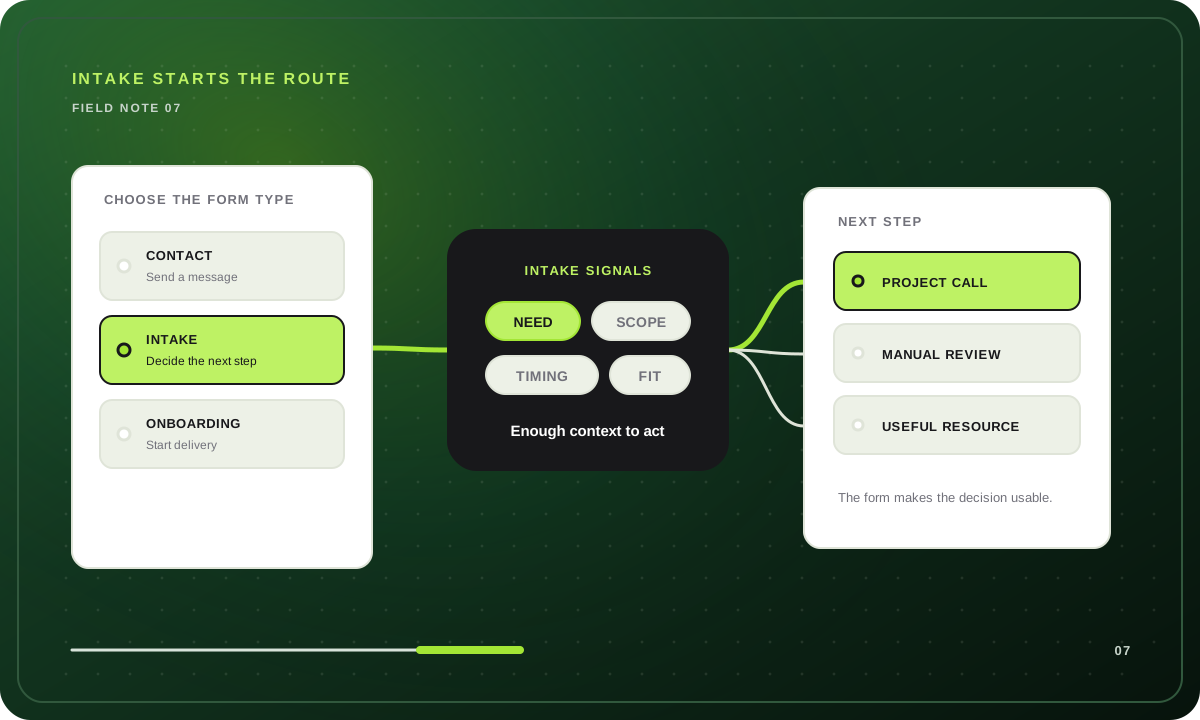
The practical answer to “what is an intake form?” is simple: an intake form is a structured questionnaire that collects the initial information a business needs to understand a request, prepare the right people, and choose what should happen next.
It sits at the entrance to a workflow. A good intake form does more than deliver a message to an inbox. It gathers the context needed to book a useful call, request a missing detail, send the inquiry for review, recommend another resource, or explain that the request is outside the business's scope. Without that purpose, it is just a contact form wearing business-casual clothes.
This guide focuses on business intake for agencies, consultants, freelancers, and other service teams.
The form is the interface. The next-step decision is the real job.
What is an intake form used for?
An intake form creates a consistent starting point when an email or basic contact form would leave important questions unanswered. It can help a business:
- identify who is making the request;
- understand the problem, project, or service need;
- collect practical constraints such as scope, timing, and budget;
- prepare the person who will review or respond;
- route different requests to different next steps;
- keep the initial record in one place instead of reconstructing it from emails.
The form should not try to finish the entire sales, service, or onboarding process. It should collect enough information to make the next interaction more useful.
For example, an agency does not need a finished creative brief before deciding whether a project deserves a discovery call. It may only need the requested service, desired outcome, approximate scope, budget range, target date, and decision context. More detailed planning can happen after both sides agree to continue.
Intake form vs contact form vs onboarding form
These forms can contain similar fields, but they serve different moments and decisions.
| Form type | When it appears | Main purpose | Typical questions | What happens next |
|---|---|---|---|---|
| Contact form | At the first general touchpoint | Give someone a simple way to send a message | Name, email, subject, message | A person reads and responds |
| Intake form | Before review, qualification, or preparation | Collect the context needed to choose or prepare the next step | Need, scope, timing, budget, stakeholders, supporting context | Call, review, follow-up request, resource, referral, or decline |
| Onboarding form | After a client, customer, or project has been accepted | Gather the information needed to begin delivery | Team, access, assets, systems, preferences, kickoff details | Setup and service delivery begin |
A contact form is appropriate when almost every message can be handled the same way. An intake form is useful when answers change review, preparation, or routing. An onboarding form belongs after the relationship or project has already moved forward.
The boundary matters. If a prospect has not been accepted, asking for passwords, full system access, detailed internal documentation, or every asset needed for delivery is premature. If a client has already signed, asking them to prove basic sales fit again creates unnecessary friction.
A decision framework: do you need an intake form?
Use these four questions before building anything.
1. Do different requests need different next steps?
If every valid message goes to the same person and receives the same reply, a short contact form may be enough. If some requests should book a call while others need manual review, another service, a waitlist, or a resource, intake can make those paths explicit.
2. Do answers change how someone should prepare?
Even when every inquiry reaches a human, the right context can improve preparation. A consultant may need to know the business problem and stakeholders. A freelancer may need scope, budget, and timing. An agency may need the requested service and launch constraints.
3. Can you explain why each question is being asked?
Every intake question should change routing, improve review, or prepare the next conversation. If nobody uses the answer, remove the question. This keeps the form focused and reduces unnecessary data collection.
4. Is this happening before or after acceptance?
Pre-acceptance questions belong in inquiry or intake. Delivery details belong in onboarding. Separating the two helps the prospect complete a smaller first step and helps the business avoid collecting information it does not need yet.
If the answers point toward structured review before acceptance, an intake form is probably the right choice.
For a copy-ready pre-acceptance question set, use the client questionnaire guide to map fit, need, budget, timing, and authority to a deliberate next step.
Common business intake form examples
The same intake principle can support different service workflows.
Agency project intake
An agency intake form can ask which service is needed, what outcome the prospect wants, the likely scope, the target launch date, the approved or discussed budget range, and who will participate in the decision. The answers can lead to a project call, a planning resource, a request for more context, or a transparent response that the work is outside the agency's offer.
See how this maps to an agency inquiry workflow.
Consulting opportunity intake
A consultant may need the business problem, its current impact, previous attempts, stakeholders, timing, and investment context. The purpose is not to diagnose the entire organization through a form. It is to decide whether a first conversation is relevant and what that conversation should examine.
Explore the consulting intake workflow.
Freelance project intake
A freelancer can use intake to identify the deliverable, service fit, budget, deadline, approval process, and any useful link. This replaces open-ended email with a brief that can be reviewed quickly without asking the prospect to write a miniature proposal.
Review the freelance project inquiry workflow.
Internal request intake
Marketing, operations, IT, and product teams can use intake for internal requests. A form might collect the requesting team, desired outcome, business reason, urgency, dependencies, and required approvers. The route can then send the request to the right owner or review queue.
What information should an intake form collect?
Start with categories, then keep only the questions your process uses.
Identity and contact context
Ask for the minimum information needed to identify the respondent and follow up. This may be a name, work email, company, and role. A phone number, address, or other detail should be optional or omitted unless the workflow genuinely needs it.
The request or problem
Ask what the person needs and what prompted the request. A useful open question is: “What is happening now, and what would you like to be different?” This captures the job behind a service label.
Desired outcome
Ask what a successful result would look like. The answer helps the reviewer understand whether the requested deliverable and the actual goal are aligned.
Scope and constraints
Use ranges or choices for facts that determine fit, such as service type, project size, location, timeline, or budget. Avoid false precision. Someone may be able to choose an investment range before they can name an exact figure.
Decision context
For a business purchase, ask who owns the decision, who else is involved, and what must happen before work can begin. This is more useful than assuming the person completing the form has final authority.
Optional supporting context
Leave room for an important link, file, dependency, or detail that the structured questions did not cover. Optional context should stay optional unless every valid request requires it.
The Project Inquiry form template provides a working example with service, outcome, scope, budget, timing, decision-role, and open-context questions.
How to create an intake form that leads somewhere useful
Step 1: define the possible next steps
Write the endings before the questions. A business intake might lead to:
- a discovery or project call;
- manual review;
- a request for one missing detail;
- a planning guide or alternative offer;
- a referral;
- a respectful out-of-scope response.
If the business cannot explain what happens after submission, adding more questions will not fix the workflow.
Step 2: identify the evidence each next step needs
For each route, list the facts or context required to choose it. Fixed boundaries might include service availability, geography, budget range, or start date. Judgment may be needed when several open answers must be considered together.
Step 3: turn the evidence into focused questions
Prefer a clear choice when the boundary is exact and an open question when the respondent's own explanation matters. Supporting text should explain the expected level of detail without coaching the person toward a preferred answer.
Use clear labels, concise instructions, useful validation, and an explicit completion message. Ask only for information required to choose or prepare the next step.
Step 4: keep hard rules deterministic
If the business does not offer a service, cannot work in a location, or has a published minimum constraint, represent that rule directly. Do not ask a model to infer an answer that the form can collect explicitly.
Step 5: use judgment only where it adds value
Several open answers may need to be understood together. A human reviewer or an optional AI qualification step can compare that context with a written policy. The result should include a reason, and the process should retain a visible fallback when qualification is unavailable.
For a deeper explanation, read how AI qualification fits inside a fixed route.
Step 6: write a useful ending for every route
“Thanks, we will be in touch” hides the decision. A better ending says what was received, what happens next, and when the respondent should expect it. If the next step is an external booking page or resource, label the destination clearly.
Step 7: test realistic edge cases
Run the form as an ideal fit, a possible fit with missing context, an out-of-scope request, a contradictory response, and a mobile user. If the workflow includes optional AI, test the configured fallback too.
A complete intake route example
Consider a small web agency that offers strategy, design, and development projects.
| Stage | Question or decision | Why it exists |
|---|---|---|
| Service | Which service best matches the project? | Sends unsupported requests to a useful alternative |
| Outcome | What should be different after this project? | Reveals the goal behind the deliverable |
| Scope | What needs to be created or changed? | Gives the reviewer a practical project shape |
| Budget | Which investment range is available? | Checks a published engagement boundary |
| Timing | When should work begin? | Compares the request with capacity |
| Decision | Who will approve the project? | Makes the buying process visible |
| Context | What else should the team know? | Captures a link, dependency, or useful nuance |
| Route | Do service, scope, timing, and decision context support a call? | Chooses the most useful next step |
One route can open a project-call destination. Another can confirm manual review when context is incomplete. A third can provide a relevant resource or transparent out-of-scope response.
The important point is not that one route is “good” and another is “bad.” Each ending should help the respondent understand what happens next.
Common intake form mistakes
Asking every possible question
Long intake often happens because every team adds a field. Review the form as one decision system. Remove questions that do not change routing, review, preparation, or a necessary record.
Repeating the sales call in writing
Intake should prepare the conversation, not replace curiosity and follow-up. Ask for the minimum context that makes the next interaction worthwhile.
Mixing intake and onboarding
Prospects should not provide delivery access, full internal documentation, or implementation details before they know whether the relationship will continue. Move those questions into a post-acceptance onboarding flow.
Collecting sensitive information without a clear need
Keep only information that is essential to the business. Review what the form collects, who can access it, and how long it should be retained.
Hiding the next step
A form can route correctly and still create a poor experience if its ending is vague. Tell the respondent whether the request will be reviewed, whether another detail is needed, or whether they can continue to a call or resource.
Treating AI as the route
AI can interpret nuanced context, but it should not secretly control the question order or invent the next step. Keep the route inspectable, express hard rules directly, and choose a fallback.
How the workflow maps to Qualyo
Qualyo stores the intake as a visual graph made from questions, Logic cards, an optional Qualifier, Router cards, and endings. The saved graph chooses which question or ending comes next.
Conversational mode can personalize the wording of an already selected question. Classic mode can show the same saved questions in a familiar form layout. Neither presentation changes the underlying route.
For explicit boundaries, use choices and Logic cards. For judgment across several written answers, an optional Qualifier can compare the responses with criteria written by the form owner. The owner also selects the automatic outcome used if qualification is unavailable.
Every route can finish with a tailored message or an external destination. Submission notifications and webhooks can pass the saved response into a later workflow. Qualyo does not provide a native CRM, scheduling platform, payment system, contract workflow, or blanket compliance certification.
If you are designing intake before a call, the guide to pre-qualifying leads before discovery explains how to separate fixed rules from judgment.
Frequently asked questions
What is the purpose of an intake form?
The purpose of an intake form is to collect the initial information needed to understand a request and choose or prepare the next step. That may be a call, review, follow-up question, resource, referral, or out-of-scope response.
Who fills out an intake form?
The person making the request usually completes it. That might be a prospective client, customer, vendor, employee, applicant, or internal stakeholder. The questions should match that person's stage and relationship with the organization.
Is an intake form the same as a contact form?
No. A contact form mainly provides a way to send a message. An intake form collects structured context used for review, preparation, or routing. If every message follows the same path, a contact form may be sufficient.
Is intake the same as onboarding?
No. Intake generally happens before a request, prospect, or project has been fully accepted. Onboarding happens after acceptance and gathers the details needed to begin delivery or setup.
How long should an intake form be?
There is no universal number of questions. Keep every question whose answer changes routing, review, preparation, or a necessary record, then remove the rest. A focused form with conditional paths can be more useful than a long universal questionnaire.
Should intake happen before or after a call?
Use intake before a call when the answers affect whether the call should happen or how someone should prepare. If every inquiry deserves the same conversation, a short booking flow may be enough. Additional details can be collected after the call or during onboarding.
Does an intake form need AI?
No. Many intake workflows can use fixed choices, conditions, routers, and tailored endings. AI is optional and is most useful when several open-ended answers need to be compared with a written policy.
Start with the decision, then build the form
An intake form is valuable when it gives both sides a better next step. Define the possible outcomes, identify the evidence each outcome needs, ask only for that context, and make every ending explicit.
Start with the real Project Inquiry form template, adapt the questions and boundaries to your business, or create a free form and draw the route from scratch.